Introduction to MATLAB
Why Computing?
Engineering problems can be described mathematically
- Newton’s Laws
- Conservation of Mass, Momentum, Energy
- Structural analysis (forces, stresses, strains)
- Vehicle dynamics
These mathematical equations can be solved either
- Analytically (pen & paper)
- Computationally (writing an appropriate program to do the work)
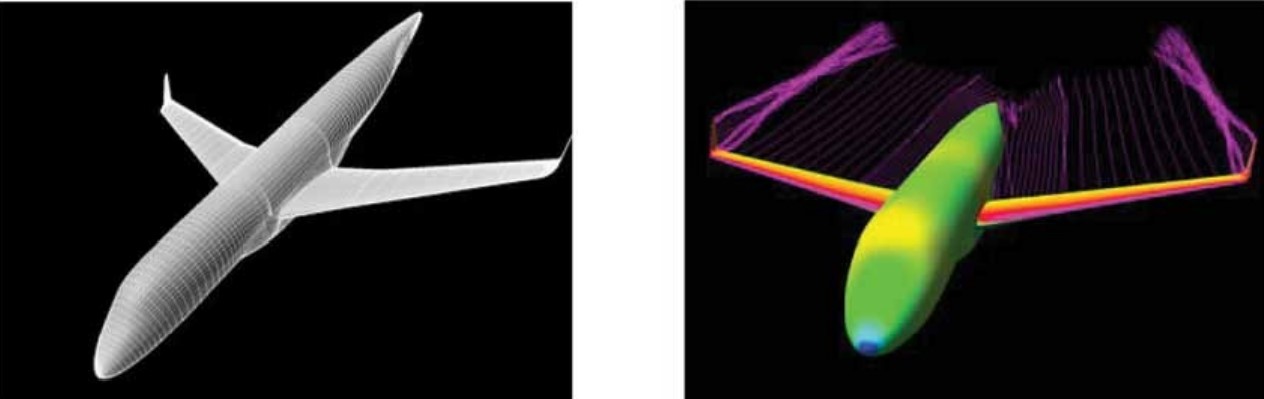
Example: The flow around an aircraft
Trying to find the pressure distribution and resulting aerodynamic forces around an aircraft
- Equations for mass and momentum conservation must be solved\[ \rho \left( \frac{\partial}{\partial t} + \mathbf{u} \cdot \nabla \right) \mathbf{u} + \nabla p = 0, \quad \qquad \frac{\partial \rho}{\partial t} + \nabla \cdot (\rho\mathbf{u})=0\]
- Impossible to do analytically for a complex shape
(O. C. de Resende, EMBRAER)
Why MATLAB?
There are numerous programming languages we can use
- Fortran
- C++, C, C#
- Python
- Java
- Julia
We will work with MATLAB
- Easy to use
- Little knowledge of computing required to start out
- Easy (and pretty) graphics
- Extensible (many additional toolboxes and libraries to simplify your life!)
MATLAB as a calculator
At the most basic level, MATLAB is a fancy calculator
- Type arithmetic operations to evaluate the result
>> (2.5+1.3)/2^2
>> (5/4-2.75)^0.5
MATLAB uses the usual mathematical operators
- Addition: +
- Subtraction: -
- Multiplication: *
- Division: /
- Exponentiation: ^
MATLAB, like most calculators, also has functions
- sine: sin()
- cosine: cos()
- tangent: tan()
- exponential: exp()
- logarithms: log(), log10()
- factorials: factorial()
And many more!
To find out more about a function, just ask MATLAB for help.